Moving data out of an old system without losing any
A data migration succeeds or fails before the final night. The method that works is dull: rehearse, reconcile, and rehearse again.
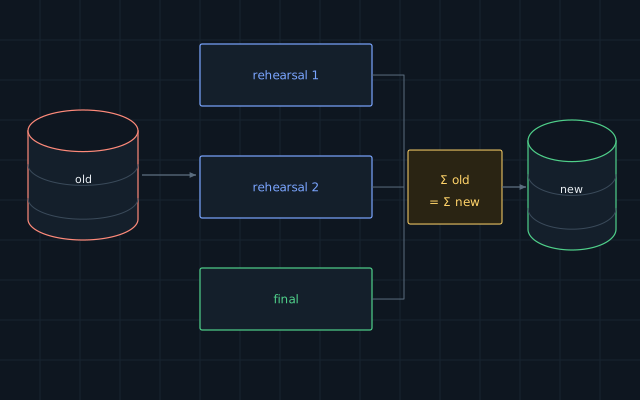
Replacing an old accounting or management system is rarely hard because of the new software. It is hard because of the data in the old one: years of records, created under rules that nobody remembers, by people who have left.
Take stock first
List every table or file that holds data, what it means and who uses it. Find out which fields are really in use and which have been repurposed. A column called comment may turn out to hold tax numbers, because someone needed a place for them in 2014.
Decide what you are not moving. Closed records from long ago may be better kept in a read-only archive than carried into the new structure.
Write the mapping down
For each target field, record its source, the conversion rule and what happens when the value is empty or invalid. This document is dull, and it is the most valuable document in the project. It is also what your accountant checks.
Clean at the source where you can
Duplicate customers, inconsistent names and impossible dates should be fixed by the people who understand them. Automatic cleaning handles formats. It cannot decide which of two customers is the real one.
Rehearse
Run the whole migration on a copy of the data, into a test copy of the new system. Then do it again. Each rehearsal finds problems the previous one hid, and each one tells you how long the final transfer will take.
Automate the migration as a script from the start. If any step is done by hand, the rehearsal is not a rehearsal.
Reconcile
After each run, compare the two systems using numbers that people trust:
- count of records in each category;
- totals of invoices, payments and balances for each period;
- stock quantities by item and location;
- a sample of individual records opened side by side.
An accountant should sign off these comparisons. If a total differs by one cent, find out why. Small differences are often the visible edge of a systematic error.
The final transfer
Choose a time when the business can stop entering data. Freeze the old system, run the rehearsed script, reconcile, and let the agreed person decide to go ahead.
Write down the point of no return and the way back. Until that point, the old system stays ready to resume. After it, keep the old system available read-only for several months, because someone will need to look something up.
Written by the Avtim engineering team. This is general information; check it against your own system before relying on it.