What makes a website feel fast
Speed is not one number. It is how soon people see the content, how quickly the page answers them, and whether it stays still while they read.
Հոդվածները հրապարակվում են անգլերեն։
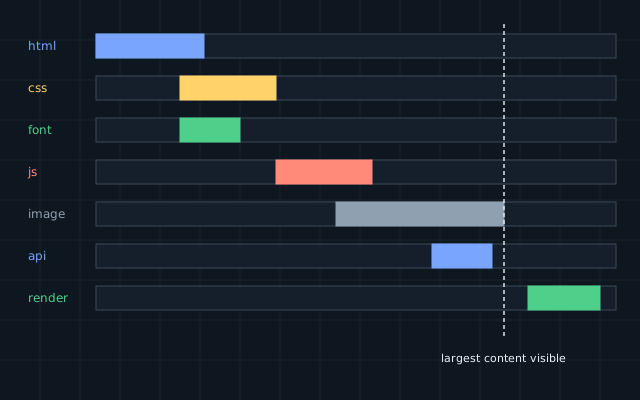
A slow site loses people before it has said anything. Before trying to fix one, though, it helps to know what “slow” means, since a page can score well on one measure and still feel broken.
Three things people notice
Google’s Core Web Vitals give a practical definition, based on what real visitors experience:
| Measure | What it describes | Good result |
|---|---|---|
| Largest Contentful Paint (LCP) | When the main content appears | 2.5 s or less |
| Interaction to Next Paint (INP) | How quickly the page responds to input | 200 ms or less |
| Cumulative Layout Shift (CLS) | How much the layout jumps while loading | 0.1 or less |
The targets apply to the 75th percentile of visits, so most of your visitors must have a good experience, including those on an ordinary phone.
Where the time goes
Open the network waterfall in your browser’s developer tools and read it from the top. The usual culprits are:
Images. They are often the heaviest part of a page. Use modern formats such as WebP or AVIF, serve sizes that fit the screen, and lazy-load what is below the fold. Do not lazy-load the main image at the top.
JavaScript. It costs twice: once to download, and again to run on the visitor’s processor. Large bundles and third-party scripts are the most common cause of poor responsiveness. Each tag someone adds “just for marketing” has a price.
Fonts. Serve them yourself, limit the number of weights and use font-display: swap, so that text is visible while fonts load.
The server. If the first byte takes a second to arrive, nothing else can start. Cache whatever does not change per visitor, and look at slow database queries.
Stop the page jumping
Layout shift is the easiest measure to fix. Give images and embedded content explicit dimensions. Reserve space for anything that loads later. Never insert a banner above content the visitor is already reading.
Measure properly
A test on a developer’s fast computer shows the best case. Test on a mid-range phone over a throttled connection, and collect real-user data if you can. Lab tools tell you what to fix, and field data tells you whether the fix helped.
Keep it fast
Sites do not get slow in one step. They get slower with each added script and each larger image. Set a performance budget, such as a limit on the weight of JavaScript per page, and check it automatically on every release. Exceeding the budget should stop the release in the same way a failed test does.
Գրել է Avtim-ի ինժեներական թիմը։ Սա ընդհանուր տեղեկատվություն է. նախքան հիմնվելը ստուգեք այն ձեր սեփական համակարգի հետ։